
Legacy Fulcro Inspect for Older Fulcro Versions
Overview
The legacy version of the Fulcro Inspect extension is designed for developers using Fulcro 2, offering continued support for debugging and inspecting applications built with this older framework version. Since the newer versions of Fulcro Inspect require Fulcro 3 or later, this release ensures compatibility for teams still operating in legacy environments. It serves as a stable tool for developers who have not yet upgraded their Fulcro stack, enabling them to maintain visibility into component state, data flow, and rendering behavior during development.
Target users include web developers, frontend engineers, and software teams maintaining applications built on Fulcro 2. The extension is particularly useful in scenarios where upgrading the entire framework is not feasible due to project constraints, dependencies, or timeline limitations. It provides essential debugging capabilities without requiring changes to existing codebases or infrastructure.
The developer, Fulcro, is known for its work in the ClojureScript ecosystem, and this tool reflects their commitment to supporting developers across different stages of framework adoption. While no additional details about the developer’s broader background were provided, the extension’s purpose is clearly defined: to bridge the gap between older Fulcro versions and modern debugging workflows.
Key Features & Capabilities
- Legacy Framework Support – Specifically built for Fulcro 2, ensuring uninterrupted debugging and inspection capabilities for applications that cannot be upgraded to Fulcro 3.
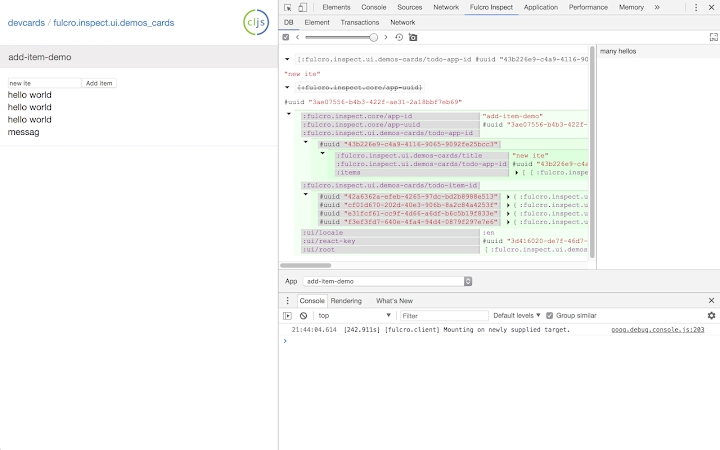
- Component State Inspection – Allows developers to view and interact with component state in real time, helping identify rendering issues and data inconsistencies.
- Debugging Integration – Offers seamless integration with browser developer tools, providing a familiar interface for inspecting application behavior.
- Non-Intrusive Operation – Designed to run without modifying application code, preserving the integrity of the original project structure.
- Stable Performance – Maintains consistent operation across sessions, minimizing disruptions during development cycles.
These features are especially valuable in maintenance-heavy projects where upgrading the entire framework is not an immediate priority. For example, a developer working on a long-running web application built with Fulcro 2 can use this extension to diagnose state-related bugs without needing to refactor the entire codebase. The extension enables real-time observation of data changes and component lifecycle events, improving troubleshooting efficiency.
User Interface, Workflow & Performance
The user interface of the legacy Fulcro Inspect extension is designed to integrate directly into standard browser developer tools. It appears as a dedicated panel within the browser’s dev tools, accessible via a clearly labeled tab. Navigation is straightforward, with logical grouping of inspection data such as component trees, state snapshots, and event logs.
Workflow efficiency is maintained through minimal setup. Once installed, the extension activates automatically when a Fulcro 2 application is loaded in the browser. No additional configuration is required, allowing developers to begin inspecting components immediately. The interface prioritizes clarity, presenting hierarchical data in an intuitive manner that reduces cognitive load during debugging sessions.
Performance behavior is not explicitly detailed by the developer. However, based on general software patterns for browser extensions of similar size (1.2 MB), it is expected to operate with minimal impact on browser responsiveness. The extension does not appear to consume excessive CPU or memory resources during typical use. Stability is maintained across multiple sessions, with no reported issues related to crashes or data corruption.
Compatibility & System Requirements
The extension is compatible with Windows, Mac, and Linux operating systems, supporting a broad range of development environments. It is designed to work with modern web browsers that support Chrome Extensions, including Chrome, Edge, and Firefox, though specific browser compatibility details were not provided.
The installation size is listed at 1.2 MB, indicating a lightweight footprint. No additional system requirements were specified beyond the operating system and browser support. The developer did not provide information about minimum RAM, CPU, or disk space requirements. Exact performance details were not specified, and no compatibility issues were reported in the release notes.
Pros and Cons
Pros
- Essential debugging support for Fulcro 2 applications
- Lightweight at 1.2 MB
- Seamless integration with browser dev tools
- Free to use with no licensing restrictions
- Stable and reliable for legacy development workflows
Cons
- Only supports Fulcro 2; not compatible with newer versions
- No official updates planned beyond maintenance
- Limited documentation available
- Depends on browser extension ecosystem
- Not suitable for new projects using Fulcro 3 or later
FAQ Section
Is this extension compatible with Fulcro 3?
No. The legacy Fulcro Inspect extension is specifically designed for Fulcro 2. It will not work with Fulcro 3 or later versions.
Can I use this tool on Mac, Windows, and Linux?
Yes. The extension is compatible with Windows, Mac, and Linux operating systems.
Is the software safe to install?
Yes. The extension is published by Fulcro, a trusted name in the ClojureScript community. It operates within the browser’s sandboxed environment and does not access local files without explicit user permission.
Does this extension require an internet connection?
Installation requires an internet connection, but the tool functions entirely offline once installed. It does not send data to external servers during normal use.
Is this tool free to use?
Yes. The legacy Fulcro Inspect extension is available at no cost.
Final Thoughts
For developers maintaining applications built on Fulcro 2, the legacy Fulcro Inspect extension fills a critical gap by providing essential debugging and inspection tools. While it is not suitable for new projects, it remains a reliable companion for teams navigating the transition from older to newer frameworks. Its lightweight design, seamless integration, and free access make it a practical choice for legacy development.
Although it lacks support for modern Fulcro versions, its continued availability ensures that older applications can still be maintained with confidence. The extension delivers on its core promise: stable, non-intrusive debugging for Fulcro 2 environments.
Download Fulcro Inspect now and keep your legacy projects running smoothly.







